UVIRA IFC 1.3 flight controller
Datasheet for board revision 1.3 (marked "UVIRA IFC v1.3" on the board), October 2026.
Designed in-house by UVIRA Aerospace.
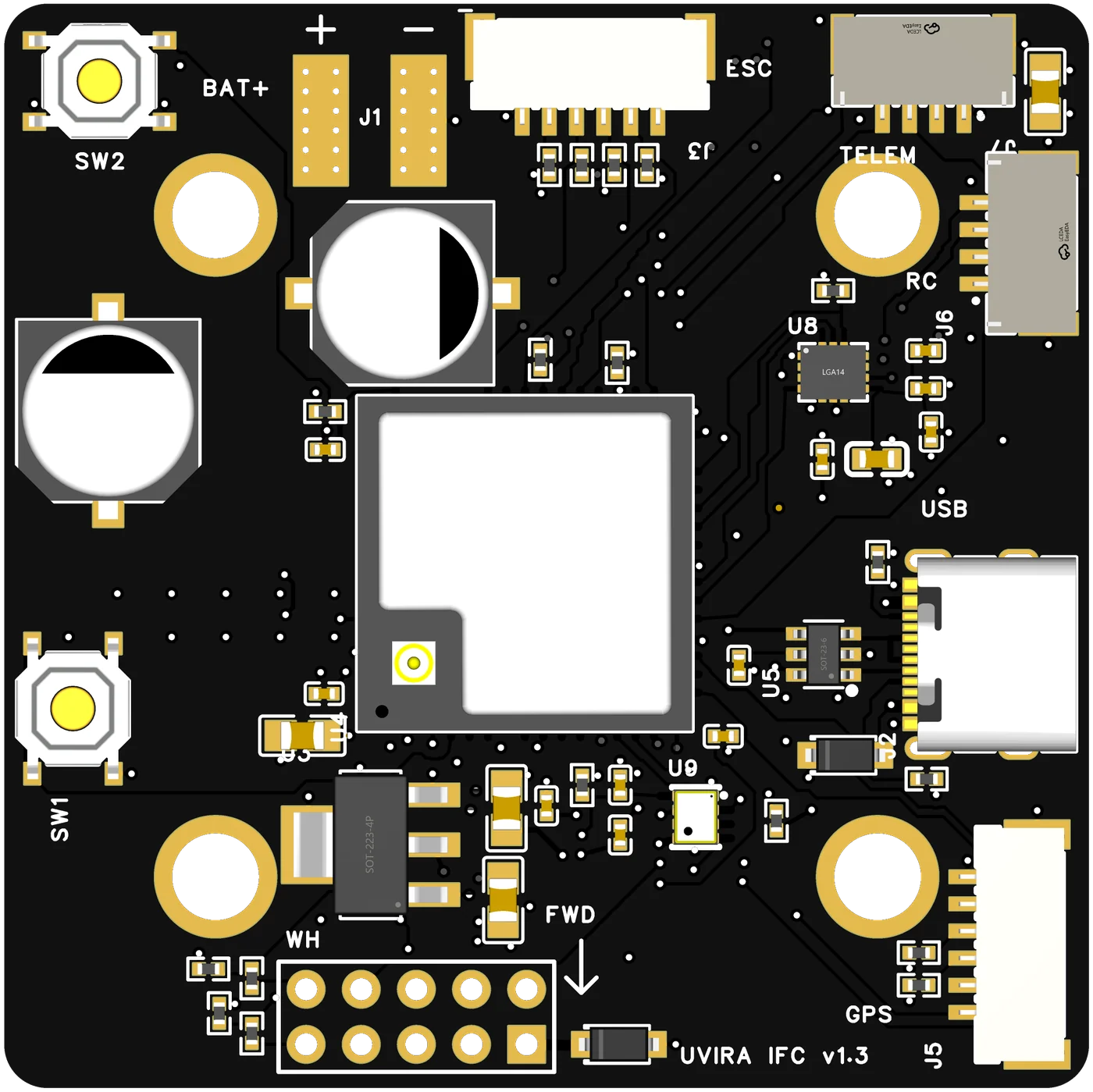
A 50 x 50 mm flight controller for Quad X drones. Set up from a phone over its own Wi-Fi, flown with or without GPS, and programmed with blocks in UVIRA FORGE Studio.
In the box, and what you add
In the box
- The IFC 1.3
- Mating connectors with leads: 6-pin (ESC), 6-pin (GPS), two 4-pin (receiver, telemetry)
- A 2.4 GHz Wi-Fi antenna (U.FL)
- Four vibration dampers
- The card: serial, activation code, Wi-Fi name and password, three QR codes
You add
- A Quad X frame, four motors and props, four ESCs or one 4-in-1 ESC (bidirectional DShot; for the battery reading, DShot extended telemetry)
- A 6S LiPo battery
- A radio and receiver (ELRS / CRSF, SBUS or iBUS)
- Optional: GPS with compass, telemetry radio
To set it up
- A phone (any browser): the board's own Wi-Fi opens its setup page
- Optional: a Windows PC with UVIRA FORGE Studio for the simulation, flight recordings, FORGE programs and firmware updates
Compatibility: ESC firmware with bidirectional DShot and extended telemetry, for example AM32 (2.0 or newer), Bluejay or BLHeli_32 (32.10 or newer).
Wiring diagram
The receiver, GPS with compass, telemetry radio and ESC on their connectors, every wire named. Point at a device to see its wires.
Connectors and pinouts
Pin 1 is marked on each mating connector's lead. Signal names are from the side of the device that plugs in.
J1Battery
| Pad | Signal |
|---|---|
| + (left block, BAT+) | Battery + (6S) |
| − (right block) | Battery − |
Solder pads. No reverse-polarity protection.
J3ESC, 6-pin 1.25 mm
| Pin | Signal |
|---|---|
| 1 | GND |
| 2 | M1 front left |
| 3 | M2 back left |
| 4 | M3 back right |
| 5 | M4 front right |
| 6 | GND |
Bidirectional DShot (150, 300, 600) or PWM, 3.3 V logic. Places for Quad X, FWD arrow to the front.
J6RC receiver, 4-pin 1.25 mm
| Pin | Signal |
|---|---|
| 1 | +5 V |
| 2 | GND |
| 3 | Receiver TX (into the board) |
| 4 | Receiver RX (out of the board) |
CRSF / ELRS, SBUS or iBUS, found by itself. For SBUS and iBUS only pin 3 carries data.
J5GPS and compass, 6-pin 1.25 mm
| Pin | Signal |
|---|---|
| 1 | +5 V |
| 2 | GND |
| 3 | SCL (compass) |
| 4 | SDA (compass) |
| 5 | GPS TX (into the board) |
| 6 | GPS RX (out of the board) |
UBX or NMEA GPS. Compasses found by themselves: QMC5883L, QMC5883P, HMC5883L, IST8310, IST8308, LIS3MDL, MMC5883MA, MMC5603, MMC5983MA, RM3100, BMM150, AK09916 and AK09918.
J7Telemetry radio, 4-pin 1.25 mm
| Pin | Signal |
|---|---|
| 1 | +5 V |
| 2 | GND |
| 3 | Radio TX (into the board) |
| 4 | Radio RX (out of the board) |
Optional. At each power-up the board's start-up messages appear for a moment on pin 4; a telemetry radio ignores them.
J2USB-C
USB 2.0 full speed, protected against static. Firmware updates from FORGE Studio and a companion computer's data. Powers the processor and sensors when no battery is fitted.
SWButtons
| Button | What it does |
|---|---|
| SW2 (RESET) | Restarts the board, as unplugging and plugging the power does |
| SW1 (BOOT) | Only for firmware recovery: hold it while plugging in the USB cable, then install the firmware from FORGE Studio. Not needed in normal use |
SW2 is at the top-left corner, SW1 on the left edge.
ANTAntenna socket
U.FL on the processor module, for the board's 2.4 GHz Wi-Fi (its own hotspot and your network). Fit a 2.4 GHz antenna before powering; lead it away from carbon and metal.
J4 payload connector
2 x 5 male pins, 2.54 mm, bottom edge. Pin 1 is the square pad; pin 6 is directly above it. In FORGE Studio, blocks switch the eSwitch output (SW+) and read the four analog inputs during a flight.
| Pin | Signal | What it does | Range |
|---|---|---|---|
| 1, 6 | SW+ (eSwitch output) | Battery voltage out, switched on and off by the board (a FORGE block), behind an electronic fuse. An output: never feed power into it | Battery voltage; on only above 18.35 V (6S), cut above 30.6 V; 3 A continuous, current limit 4.6 A |
| 2, 7 | GND | ||
| 4 | Analog input A1 | Direct to the processor's ADC. With a power board: its current output | 0 to 3.1 V (never above 3.3 V) |
| 8 | Analog input A2 | Direct to the processor's ADC. With a power board on 9S to 12S: its divided voltage output | 0 to 3.1 V (never above 3.3 V) |
| 5 | Analog input A3 | Through a 22 kΩ / 10 kΩ divider (32 kΩ to ground) | 0 to 9.9 V (never above 10.5 V) |
| 10 | Analog input A4 | Through a 100 kΩ / 10 kΩ divider (110 kΩ to ground) | 0 to 34 V (never above 36 V): a battery's + up to 8S |
| 3, 9 | Control outputs | Held off from power-up; for UVIRA payload modules only | 3.3 V logic |
- ESCs that report it: bidirectional DShot with extended telemetry (the ESC firmware versions are in the compatibility note above). Voltage and current come over the motor wires; the board adds the four ESCs' currents. Nothing to wire.
- A power board, up to 8S: the battery's + to pin 10, the board's current output to pin 4, its ground to pin 2.
- A power board, 9S to 12S: the board's divided voltage output to pin 8 (a full battery must give under 3.1 V there: for 12S a 1/17 divider or more, e.g. 1/21), the current output to pin 4, ground to pin 2.
Power
| Battery input | 6S LiPo (22.2 V nominal, 25.2 V full). Starts at 10.9 V, keeps running down to 9.6 V. Surge clamp (TVS); no reverse-polarity protection |
|---|---|
| 5 V peripherals | 5.0 V, 3 A, for J5, J6 and J7, with the battery only |
| 5 V system | 5.0 V, 1 A, for the processor and sensors (from USB when no battery is fitted) |
| Sensors | The motion sensor has its own low-noise 3.3 V supply, away from the regulators |
| Payload | Battery voltage through an electronic fuse: 18.35 V to 30.6 V, 3 A continuous |
Specifications
| Board | 50 x 50 mm, 6 layers |
|---|---|
| Mounting | 30.5 x 30.5 mm, four holes for M3, on vibration dampers |
| Weight | About 15 g (the board alone) |
| Processor | ESP32-S3 (ESP32-S3-MINI-1U), dual core 240 MHz, 8 MB flash |
| Wi-Fi | 2.4 GHz only, external antenna on U.FL; its own hotspot and your network at the same time |
| Motion sensor | TDK ICM-42688-P (gyroscope and accelerometer) |
| Barometer | Infineon DPS368 |
| Compass | On the GPS module, through J5 |
| Motor outputs | 4 x bidirectional DShot or PWM |
| Battery voltage and current | From the ESCs (bidirectional DShot with extended telemetry), or a power board on J4 (current pin 4; voltage pin 10 up to 8S, or a divided output on pin 8 for 9S to 12S) |
| Lights and buzzer | None. About five seconds after power-up the board's Wi-Fi appears: that is the sign it has started |
| Buttons | SW1 BOOT and SW2 RESET (see Buttons above) |
Mounting
- FWD arrow to the front of the drone, components up, on the four dampers. Another direction or upside down is set on the phone (Setup › Board orientation).
- Keep it away from the ESC power wires and the battery leads.
What the firmware does
| Flight modes | ACRO, STABILISE, ALTHOLD, LOITER (GPS), GUIDED (GPS), return home (GPS), LAND, FORGE |
|---|---|
| Safety | Arming checks with the reason on the phone; radio-loss, low-battery and geofence failsafes; crash detection; automatic disarm on the ground |
| Set-up | From a phone over the board's own Wi-Fi: airframe questions, orientation, level, receiver, switches, motor test, failsafes, starting tune, vibration reading |
| Practice | Simulation mode on the board itself, flown from FORGE Studio; switched off and on, it starts in Real Flight mode |
| FORGE | Programs made from blocks in FORGE Studio, sent over Wi-Fi; the eSwitch output (SW+) and the analog inputs as blocks; every limit and failsafe stays on |
| Updates | From FORGE Studio over USB, signed for each board |
Absolute limits
- Battery input: never above 25.2 V (6S full), never reversed.
- 5 V peripheral ports: 3 A in total. eSwitch output (SW+): 3 A continuous.
- J4 analog inputs: pins 4 and 8 never above 3.3 V, pin 5 never above 10.5 V, pin 10 never above 36 V.
- Logic pins are 3.3 V: never connect 5 V signals to them.
Generalizing Special Application Drones
Questions about the board? Write to us.