Set up your flight controller
From the box to its first flight, in four steps. Keep the card from the box at hand: it has the board's Wi-Fi name and password.
Fit it to your drone
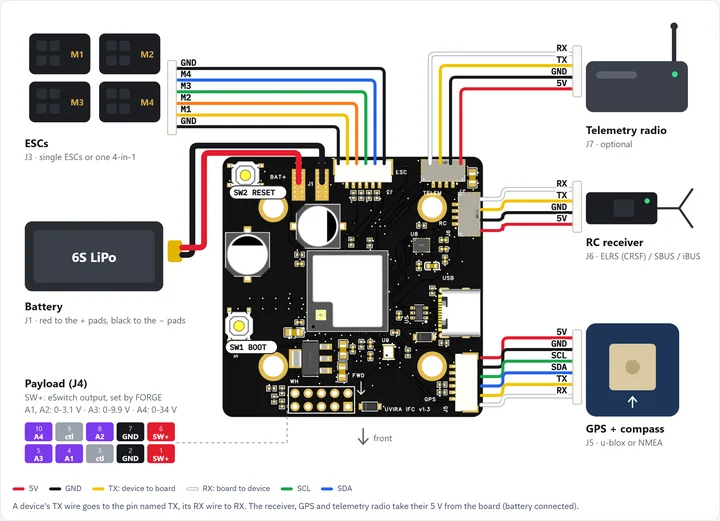
You need a Quad X frame with four motors and ESCs (DShot), a 6S battery, and a radio with its receiver (CRSF / ELRS, SBUS or iBUS). A GPS module with compass is optional: it adds holding position and coming home.
- Mount the board on its four dampers, arrow to the front.
- Solder the battery lead to J1, plug the ESCs into J3, the receiver into J6 and the GPS into J5.
- Screw on the Wi-Fi antenna. Bind the receiver to your radio, as its maker's guide says.
Join its Wi-Fi from your phone
- Connect the battery. The board has no light: about five seconds later its Wi-Fi appears on your phone.
- Scan the Wi-Fi QR code on the card with your phone camera. Or open Wi-Fi settings, choose the board's serial number (such as UV13-0004, as on the card) and type the password from the card.
- The setup page opens by itself. If it does not, tap Sign in to network. "No internet" is normal: the board is not on the internet.
Lost the card? Sign in, then See your flight controllers and press Its Wi-Fi.
Follow the setup page
Open Setup and work down the steps. Each one says what to do and why:
- Your drone's weight, frame, propellers, motors and battery.
- Which way the board points, then level it on a flat table.
- Move each stick and switch on your radio and watch it on the page; choose your arm switch and mode switch.
- Motors, still without propellers: hold to spin each one, check it is in the right place and turns the right way. Then fit the propellers.
- The battery, and what the drone does if something goes wrong.
Then on Tune, press Safe start for the first flight.
Practise in FORGE Studio, then fly
- Download FORGE Studio (Windows) and sign in with this account. Connect your board: its 2 months of FORGE Studio start then.
- To connect, on the phone's setup page open System › Simulation network and join the board to your Wi-Fi; Studio finds it by name.
- Fly it in FORGE Studio first, on your own board in simulation mode. When you are done, switch the drone off and on: it starts in Real Flight mode. What you prove in simulation is what the drone does in the air. FORGE Studio is also where you build your own FORGE programs.
- First real flight: an open space with little wind, mode switch on ALTHOLD, arm, raise the throttle smoothly past the middle. Back to the middle and it holds its height.
Your first flightFORGE Studio manual
Step by step, with pictures: the School lesson. First time in FORGE Studio: Lesson 1, Getting started.
Stuck at a step?
Every step in more detail is in the full manual. Or write to us and say which step: a person replies within 1 working day.