What You Will Learn
- Command the drone's attitude and throttle directly with fly STABILISE, the only way to turn a drone upside down on purpose.
- Time things with seconds in this state: let the drone settle, give a run-up enough time, and give up safely when something takes too long.
- Follow an angle all the way round a circle and handle the jump from +180° to -180°.
- Build a rescue path: notice when it is going wrong, level the drone and stop the fall.
- Switch a payload: turn the J4 output (the eSwitch) on and off at the right moments. In the film it drives the smoke.
- Size a bigger loop yourself: the radius and the speed it needs at the top.
Ideas First
Angles past 90°
Pitch is how far the nose points up, positive nose up. 0° is level, 90° is nose straight up and 180° is upside down. Keep turning the same way and the number jumps to -180° and counts back up: -90° is nose straight down, and 0° is level again. So in a loop the pitch passes 0, 90, 180, -90 and back to 0. The pitch input of fly STABILISE takes -180° to +180°, so a program that wants 190° must write -170°.
Why "fly to a point" can't fly a loop
fly GUIDED and fly LOITER say where to go or how fast. The flight controller then picks the lean and throttle itself and always keeps the drone upright, inside its lean limit. A loop needs the propellers to push towards the middle of the circle, and at the top the middle is below the drone, so it has to be upside down. Only an attitude command can ask for that. (The third change in More changes to try shows a drone going round the same circle without ever turning over: a circle in the sky isn't a loop.)
What fly STABILISE asks for
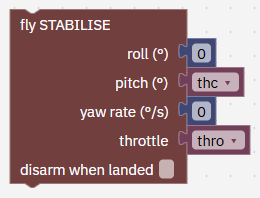
roll (deg): leaning left or right. This program keeps it at 0. pitch (deg): nose up (+) or down (-). yaw rate (deg/s): how fast to turn; 0 keeps the heading.
throttle (0 to 1): 0.5 is about a hover and 1 is about twice the drone's weight. With Any attitude it sets the propellers' push directly, whichever way the drone points.
Fast enough at the top, high enough at the bottom
At the top, gravity already pulls the drone towards the middle of the circle. Slower than about √(9.81 × radius), 14 m/s for a 20 m loop, gravity bends the path more than the circle needs, so the drone has to push upwards and stays right way up. Faster than that, it must push down towards the middle, so it goes over upside down. That's why the program asks for 15 m/s at the top. It enters at 10 m/s and speeds up on the way.
The bottom of the loop is at 40 m and the top at 80 m. The rescue needs room underneath: it takes over if the drone sinks below 28 m, and on the way down the back of the loop the drone falls at up to about 13 m/s.
Any attitude, and why it is normally off
Normally the flight controller limits how far the drone may lean. Leaning far over loses the push that holds it up, and past 90° the propellers drive it towards the ground. The limit means a wrong number in a program, or a stick held over, can only push the drone sideways.
Any attitude lifts that limit only in STABILISE (including a program flying STABILISE), on the real drone as in the simulation. Your radio's sticks still lean it only as far as Tilt at full stick. GUIDED, LOITER, ALTHOLD, return home and land keep their lean limit, and every speed, climb, geofence and failsafe limit stays. You find it in Setup › Config › Safety (change it while disarmed), on the phone page under Tune › Position, and for a single run in FORGE › Test flight.
Why a rescue state
A loop is the one time a drone is meant to be upside down, falling fast, with the ground not far off. If something goes wrong, a program that keeps following its loop maths makes it worse. So the loop checks a few plain limits on every tick, and when one is crossed it stops looping and does one simple thing: level the drone and stop the fall.
How the states fit together
climb climbs to 40 m over the start; then entry when at 39 m or higher, settled, 3 s in; brake after 60 s.
entry is the run-up to 10 m/s; then loop at 9.5 m/s or faster with 9 s or more in; brake after 25 s.
loop flies the loop with the smoke on; then exit after turning 355°; rescue when something is wrong.
exit flies out level with the smoke off; brake after 10 s. rescue levels and stops the fall with the smoke off; brake when no longer falling fast and nearly level, or after 8 s.
brake stops and holds; land after 10 s. land comes down and stops the motors.
Step by Step
-
Open the program 2 min
In Studio: FORGE
The program is called loop_pass and runs every 100 ms, 10 times a second. You can also download loop.forge.json from this page, save it in Documents › UVIRA FORGE Studio › Programs and choose it under Open.
- In FORGE, open New from example and choose Fly a loop (School lesson).
- If Studio asks Start a new program?, press Start new, lose the changes (or Cancel and save your own program first).
- Open the Checks tab. If the smoke generator is not on this computer yet, Checks says so first: leave it for now (a later step adds it). Under it: No problems. 7 states: climb, entry, loop, exit, rescue, brake, land.
Type exactly
- Start from
Fly a loop (School lesson)
It worked when FORGE shows the program loop_pass, and Checks says No problems. 7 states (the smoke may be listed as missing).
-
Read block 1: when FORGE starts, where, and the numbers you change 3 min
In Studio: FORGE
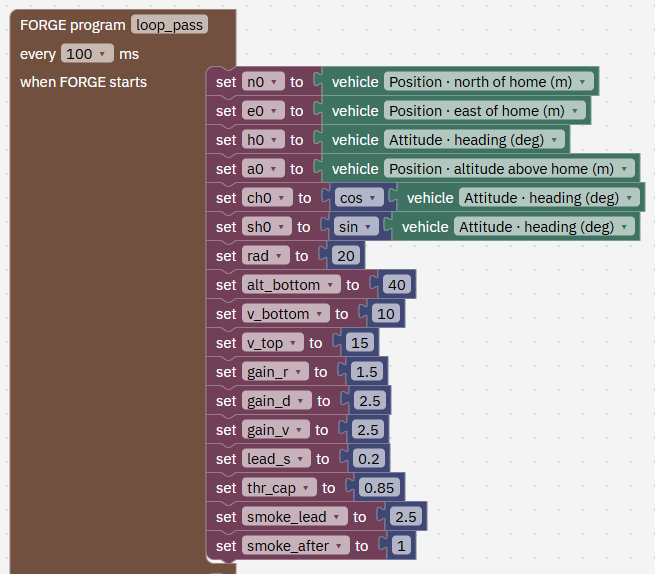
The first blocks remember where FORGE started: n0, e0, the heading h0 and the altitude a0. ch0 and sh0 are the cosine and sine of the heading, used to point along it.
The rest are the numbers you will change later: rad 20, the loop radius in m. alt_bottom 40, the height of the bottom of the loop in m. v_bottom 10, the speed at the bottom in m/s. v_top 15, the speed at the top in m/s.
gain_r, gain_d, gain_v 1.5, 2.5, 2.5: how firmly it corrects being off the circle, drifting in or out, and speed. lead_s 0.2 aims the nose 0.2 s ahead. thr_cap 0.85 is the most throttle allowed. smoke_lead 2.5 is not used yet (the smoke timing change uses it). smoke_after 1 is used in brake.
- Find the set blocks under when FORGE starts, for example set v_top to 15.
It worked when You have found rad, v_bottom, v_top and thr_cap.
-
Read block 2: state climb, up to 40 m over the start 2 min
In Studio: FORGE
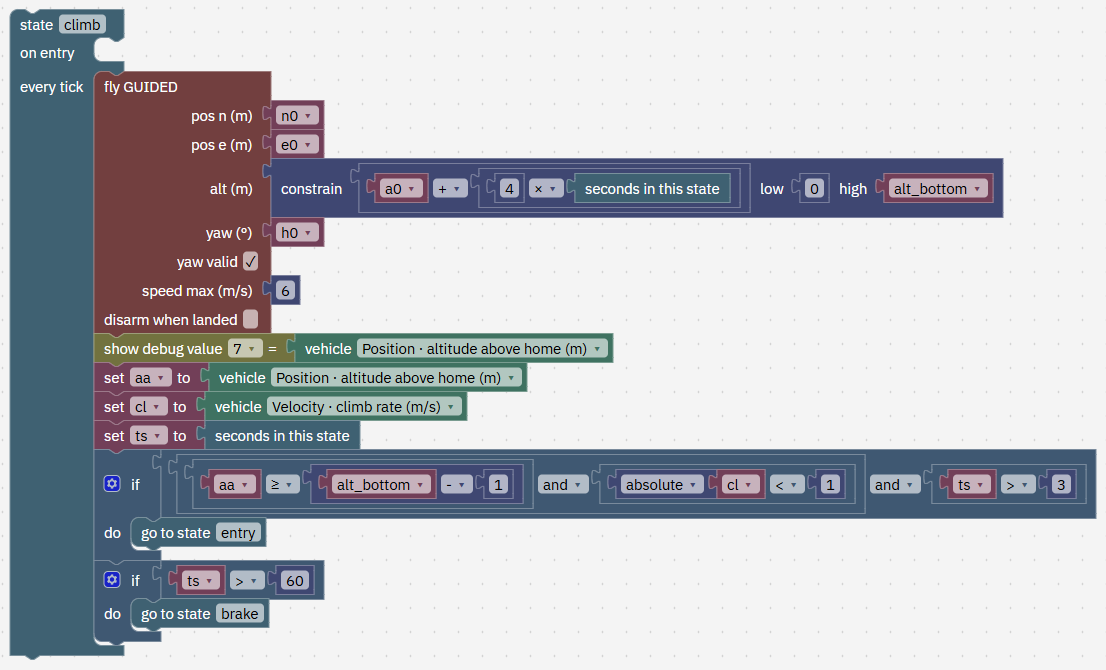
The height target rises 4 m every second from where the drone was, never above 40 m, so the drone climbs steadily over the spot where FORGE started. A fixed target of 40 m would make it lunge upwards.
It moves on only when three things are true together: at 39 m or higher, climbing slower than 1 m/s either way, and at least 3 s in this state, so a drone that is only passing through 39 m on its way up does not count. If 60 s go by (it can't climb, for example) it goes to brake. In our runs the climb took 10.6 s.
- Find state climb.
It worked when You can say the three checks before entry.
-
Read block 3: state entry, the run-up 2 min
In Studio: FORGE
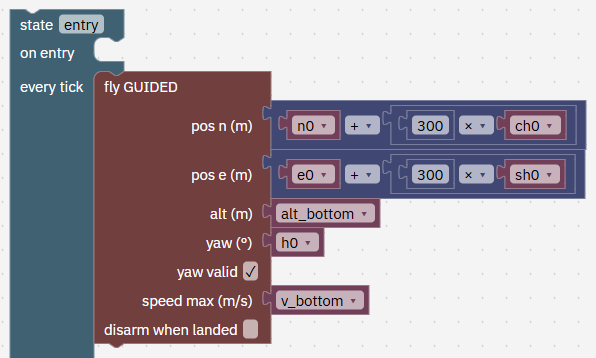
GUIDED to a point 300 m ahead along the starting heading, at 40 m, at most 10 m/s. Why so far? GUIDED slows down to stop on its target, and a point well beyond means it never starts slowing during the run-up.
- Find state entry and its fly GUIDED block.
It worked when You can say why the target is 300 m ahead.
-
Read entry's checks 2 min
In Studio: FORGE
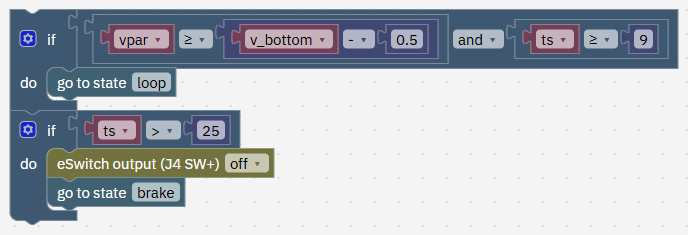
vpar is its speed along the heading (shown as value 2). The loop starts when it is at 9.5 m/s or faster and at least 9 s have passed, so it has settled at that speed instead of just touching it. After 25 s it gives up: eSwitch off, then brake. In our runs it reached 10.2 m/s, about 69 m ahead of the start.
- Find the two if blocks at the end of entry.
It worked when You can say when the loop starts.
-
Read block 4: state loop, on entry: fix the circle, smoke on 2 min
In Studio: FORGE
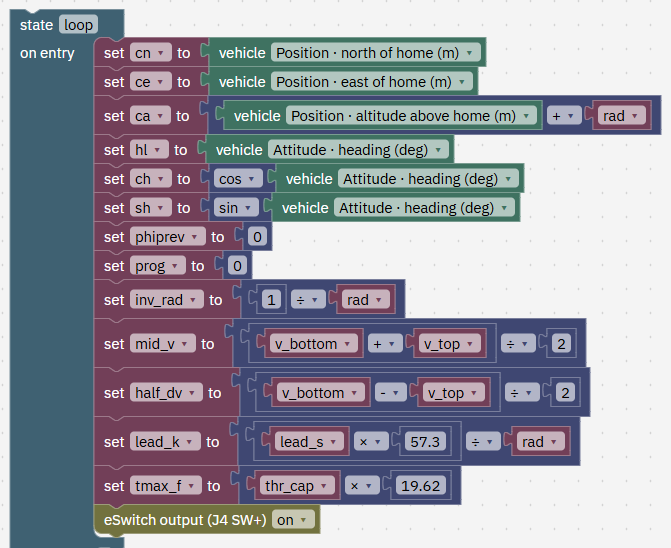
Once, as the loop starts, the program fixes the circle: its centre is straight above the drone, 20 m up, so the drone starts at the bottom. It stores the loop's heading and sets the turn counters phiprev and prog to 0. It also works out a few fixed numbers once instead of every tick: the target speed going from 10 m/s at the bottom to 15 at the top, the nose lead per m/s, and the throttle cap as a push.
The last block, eSwitch output (J4 SW+) on, powers the J4 payload output. In the film that is the smoke.
- Find state loop's on entry blocks.
It worked when You can say where the circle's centre is.
-
Read block 5: every tick, where on the circle am I? 2 min
In Studio: FORGE
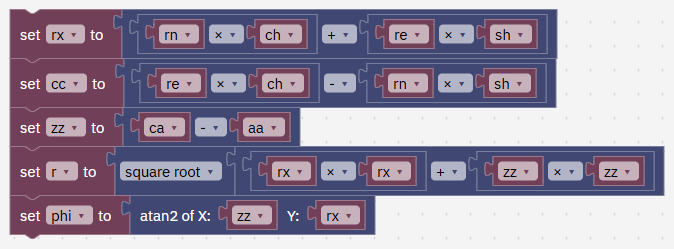
rx is how far forward of the centre the drone is along the loop's heading, zz how far below it, and cc how far sideways out of the loop's plane. r is the distance from the centre. phi, worked out with atan2, is the angle round the circle: 0° at the bottom, 90° at the front, 180° at the top, -90° at the back.
- Find the blocks that set rx, cc, zz, r and phi.
It worked when You can say what phi is at the top of the loop.
-
Read block 6: every tick, how far have I turned? 2 min
In Studio: FORGE
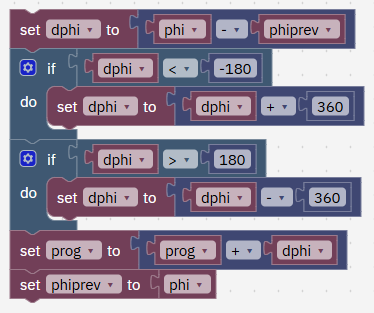
dphi is how far phi moved since the last tick. At the top, phi jumps from about +178° to -178°, which looks like a change of -356°. The two if blocks fix that jump, giving the real +4°. Then prog adds up the turn smoothly from 0 to 360.
- Find dphi and the two if blocks after it.
It worked when You can say what the two if blocks fix.
-
Read block 7: every tick, the push the loop needs 2 min
In Studio: FORGE
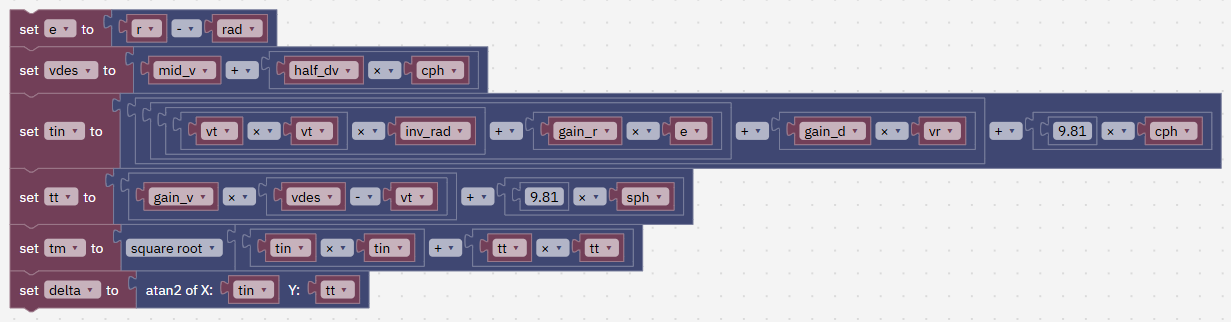
e is how far off the circle the drone is (+ is outside), and vdes the speed it wants: 10 m/s at the bottom rising to 15 at the top. Then the push: towards the centre (tin): what it takes to turn at this speed, a correction back onto the circle, a damper against drifting in or out, and gravity's part. Along the path (tt): a speed correction and gravity's part.
tm is the size of the total push, and delta how far that push tilts along the path.
- Find the blocks that set e, vdes, tin, tt, tm and delta.
It worked when You can say what tin and tt are.
-
Read block 8: every tick, pitch and throttle to ask for 3 min
In Studio: FORGE
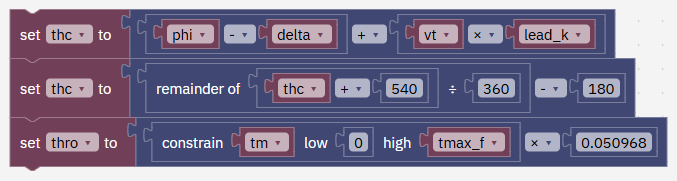
The pitch to ask for is the position on the circle, minus the tilt of the push, plus a small lead because the drone takes a moment to turn. The second block keeps it between -180 and 180: "remainder of (thc + 540) ÷ 360, minus 180" turns 190 into -170.
The throttle is the push, capped, times 0.050968 (that is 1 ÷ 19.62), which turns the push into the throttle scale where 1 is twice the drone's weight. In our runs the throttle was about 0.76 at the bottom and about 0.10 over the top.
The nose angle isn't the position on the circle. Half-way up the front (phi 90°) the nose was only about 35° up, because most of the push goes into holding the drone up against gravity.
- Find the blocks that set thc and thro.
It worked when You can say what the remainder block does.
-
Read block 9: every tick, fly it 1 min
In Studio: FORGE
fly STABILISE with roll 0, pitch thc, yaw rate 0 and throttle thro. Shown values 0 to 7 then show phi, the distance off the circle, the speed, the sideways drift, the pitch and throttle asked, and the altitude.
- Find the fly STABILISE block in state loop.
It worked when You have found fly STABILISE.
-
Read the loop's checks 2 min
In Studio: FORGE
After turning 355° it goes to exit. Stopping 5° early avoids flickering around 0° and 360° at the bottom. It goes to rescue if any of these happen: more than 10 m off the circle, more than 25 m sideways, below 28 m, or more than 45 s in the loop.
In our runs the loop took about 10.5 s, stayed within 0.5 m of the circle and 2.0 m sideways, reached 80.6 m at the top and 15.1 m/s, and left at the height it entered.
- Find the two if blocks at the end of state loop.
It worked when You can name the four limits that start the rescue.

-
Read block 10: state exit, fly out level, smoke off 1 min
In Studio: FORGE
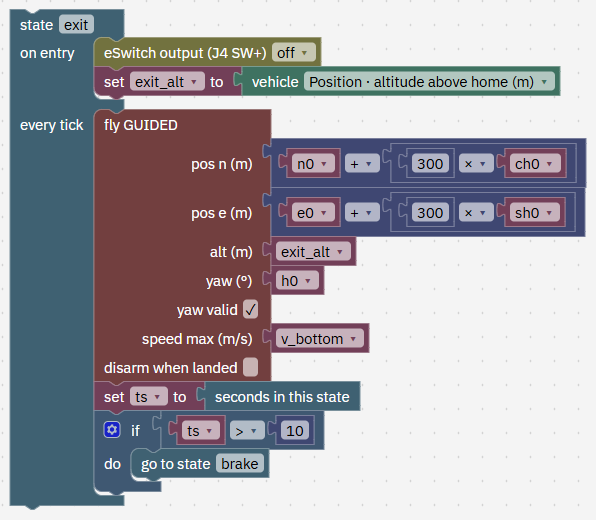
On entry the smoke goes off, so it marks exactly one loop, and the program notes the height. Then it flies straight on, level, at that height, towards the same far point. After 10 s (about 100 m) it goes to brake.
- Find state exit.
It worked when You have found state exit.
-
Read block 11: state rescue, level and stop the fall 2 min
In Studio: FORGE
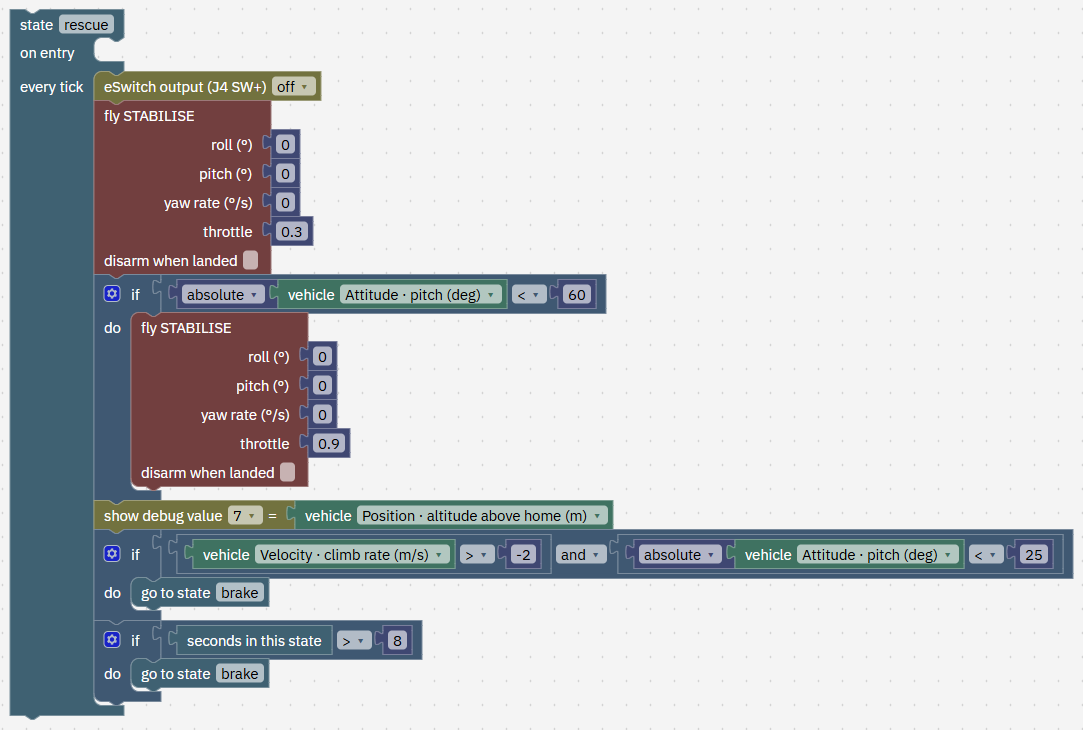
The last flight command in a tick is the one flown. So while the drone is more than 60° from level, rescue asks for level with only 0.3 throttle: upside down, a strong push would drive it towards the ground. Once it is within 60° of level, the second block takes over with 0.9 throttle to stop the fall.
It hands over to brake when it is no longer falling faster than 2 m/s and is within 25° of level, or after 8 s whatever happens. When the loop gives up while the drone is still nearly level and not falling (the weaker-drone change below), rescue hands over to brake in its first tick.
- Find state rescue and its two fly STABILISE blocks.
It worked when You can say why rescue starts with throttle 0.3.
-
Read block 12: state brake 1 min
In Studio: FORGE
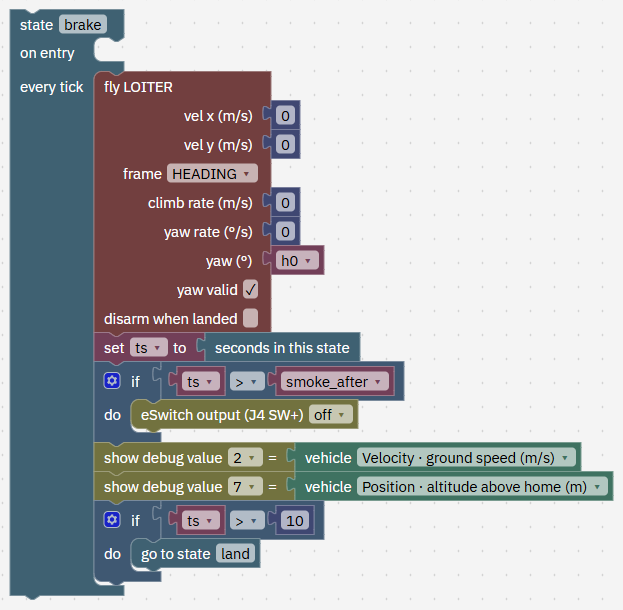
brake asks LOITER for zero velocity and zero climb: the drone stops, holds its spot and height, and faces the start heading. From 10 m/s it stopped within about 10 m and was still after about 4 s. The eSwitch-off after smoke_after is a safety net; on the normal path the smoke is already off. After 10 s it lands.
- Find state brake.
It worked when You have found state brake.
-
Read the land state 1 min
In Studio: FORGE
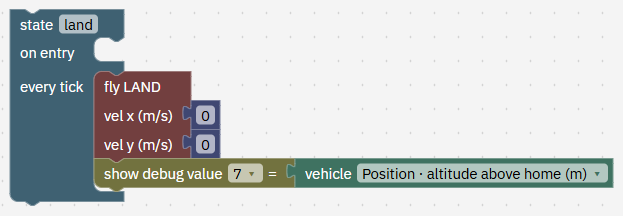
land comes straight down and stops the motors on touchdown. In our runs it took about 52 s from 40 m and touched down at 0.40 m/s, about 167 m ahead of where FORGE started.
- Find state land.
It worked when You have found state land.
-
Quick: fly it in the Test flight tab 3 min
In Studio: FORGE › Test flight
This quick run shows a report and graphs, not the 3D view, so you won't see the smoke here.
- Open the Test flight tab on the right of the editor.
- Keep From a hover at 10 m, no landing platform and set Drone that flies to QC-02, Studio's example drone.
- Tick Any attitude in STABILISE. It starts ticked or not to match your flight controller.
- Press Save and fly in simulation.
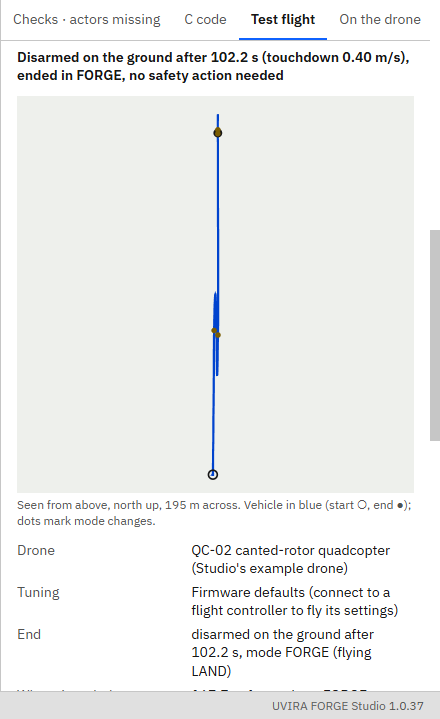
- Expect: disarmed on the ground after about 102 s, no safety action needed; altitude up to about 80 m; most tilt in the air 179° and fastest about 15.1 m/s; a touchdown of about 0.40 m/s. In the plot of the shown values, value 0 sweeps from 0° to 180°, jumps to -180° and comes back to 0°, and value 1 (off the circle) stays under 1 m.
Type exactly
- Scenario
From a hover at 10 m, no landing platform- Any attitude in STABILISE
ticked
It worked when The result says disarmed on the ground after about 102 s, altitude up to about 80 m and most tilt about 180°.
-
With the 3D view and the smoke: start the virtual flight controller 2 min
In Studio: Connect
The same program flown by a flight controller on your computer, as it would fly on the drone, and shown in 3D. Skip this step if the top bar already says Connected and Simulation.
- Press Connect, then Start the virtual flight controller.
- If Fly says it needs a place first, go to Simulate › Where it flies, type the latitude and longitude below (or your own place) and press Apply.
Type exactly
- Home latitude, °
12.9716- Home longitude, °
77.5946
It worked when The top bar says Connected and Simulation, and Fly no longer asks for a place.
-
Allow the loop 2 min
In Studio: Setup › Config › Safety
The loop needs no camera: the Companion camera on the drone can stay as it is.
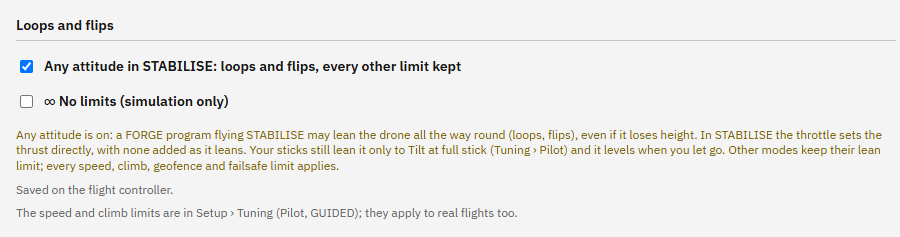
- Go to Setup › Safety and scroll down to Loops and flips. While the drone is disarmed, tick Any attitude in STABILISE.
- Wait for Saved on the flight controller.
It worked when Any attitude in STABILISE is ticked and the page says Saved on the flight controller.
-
Add the smoke (if you like) 3 min
In Studio: FORGE › Checks
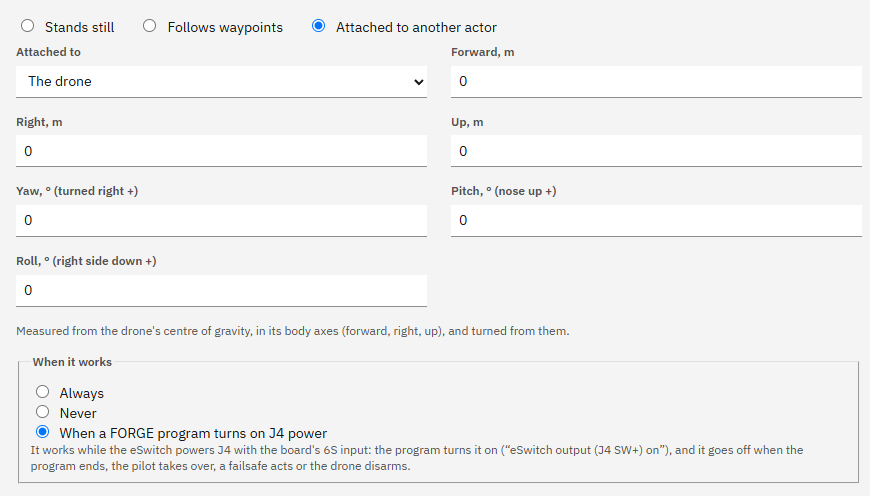
The smoke generator works while the J4 payload output is on, and the program switches J4 on for the loop and off after it. The program brings its smoke actor with it, already on the drone and switched by J4: only the 3D model may be missing on this computer.
- Open FORGE › Checks. If it says Smoke trail is made from a model this computer does not have, press Open the Marketplace, press Get on Smoke generator, then Back to FORGE.
- In FORGE › Checks, press Add it to the simulation. Simulate › Actors then lists Smoke trail, on the drone.
It worked when Simulate › Actors lists the smoke actor, on the drone, working with the drone's J4 payload power.
-
Upload the program 2 min
In Studio: FORGE
If an earlier flight left the drone off its cradle, Fly offers Restart the simulation. Press it first, then upload.
- In FORGE, with the program open, press Upload to the drone at the top right and wait for Uploaded "loop_pass" with its blocks. (In Studio 1.0.0 the button is in the Board tab.)
It worked when FORGE › On the drone says On the drone: "loop_pass", the same as the editor.
-
Take off 2 min
In Studio: Fly
Leave room. The loop is flown along the heading the drone faces when FORGE starts. Its footprint runs from about 48 m to 88 m ahead, the top is at 80 m, and the drone lands about 167 m ahead.
- On Fly, press LOITER, then press and hold Hold to arm until it arms.
- Set Take off to, m to 10 and press Take off.
Type exactly
- Take off to, m
10
It worked when Fly says Armed and the altitude reads about 10 m.
-
Run the program 3 min
In Studio: Fly
Any other mode button takes control back at once.
- Once it hovers (about 5 seconds), press FORGE and watch the 3D tab.
- It climbs to 40 m, runs in, flies the loop with the smoke on and lands about 100 seconds later, about 167 m ahead.
It worked when The drone has landed and disarmed about 167 m ahead of where FORGE started, after one loop with the smoke on.
-
More changes to try 12 min
In Studio: FORGE › Test flight
To change a number, edit it in "when FORGE starts", for example the set v_top to 15 block. Guess first, then fly and compare.
Without Any attitude (easy). Untick it and fly again. What you should see: the drone tries to pull up, can't lean far enough and climbs instead: most tilt about 39°, up to about 111 m, flying up to about 16 m/s. After about 5.0 s value 1 passes 10 m and the rescue ends the loop. It lands after about 141 s, about 73 m ahead, coming straight down where it stopped. Any drone, real or simulated, does this with this program while Any attitude is off.
A slower entry (easy). Set v_bottom to 7, then 5. Then, with 5, also set thr_cap to 0.5. What you should see: still a full loop at about 178°, but it takes 12.5 s and then 14.7 s: the drone gains speed on the way up to reach 15 m/s at the top. With thr_cap 0.5 as well, the loop sags: it gets over the top, but on the way down it falls 10 m off the circle and the rescue takes over at about 45 m.
Too slow at the top (medium). Set v_top to 12, then 10, then 14. What you should see: at 12 and 10 it still goes round the circle and lands normally, but most tilt is only 61°, then 36°. It never turns over: a circle, not a loop. With v_top 10 it even completes with Any attitude off. At 14 it flips (179°), because it actually reaches about 14.1 m/s. The rule holds: above √(9.81 × 20) ≈ 14 m/s at the top.
A weaker drone tests the rescue (medium). Set thr_cap to 0.6, then 0.45. What you should see: at 0.6 the loop sags but completes, about 6 m off the circle on the way down the back, and leaves at about 34 m. At 0.45 it can't hold the circle: about 2.5 s into the loop it is 10 m off, rescue takes over and, because the drone is nearly level and not falling, hands over to brake at once. It brakes at about 38 m and lands; about 82 s in all.
Smoke timing (harder). With the virtual flight controller, so you can see the smoke: in entry, add if seconds in this state ≥ 9 − smoke_lead, then eSwitch output (J4 SW+) on. Then move the eSwitch-off from exit's on entry to brake. What you should see: about 25 m of smoke along the run-in before the ring (2.5 s at 10 m/s). With the second change the smoke also trails the 100 m run-out, and smoke_after finally does its job.
Crosswind (harder). In the Test flight tab set Wind from the east, m/s to 3, then 5. What you should see: the loop still completes but drifts about 11 m, then 20 m sideways (value 3), close to the 25 m rescue limit. The program always asks for roll 0, so nothing pushes back against the wind. Adding that is a good next project.
- Make one change, fly it, compare, and put it back.
It worked when You have tried at least one change and compared the result.
-
Common mistakes 3 min
In Studio: FORGE
Forgetting Any attitude, or flying the loop with GUIDED or LOITER. Only STABILISE gets the freedom. Without it the drone climbs past 100 m instead of looping.
Changing the radius alone. With rad 30, 15 m/s at the top is too slow (it needs more than 17 m/s), so the drone stays upright, reaching only about 65°. With Any attitude off as well, it climbed to about 126 m and set off the 120 m geofence, which started a return home. Change v_top with rad, and keep the top under the fence height.
Adding up phi without fixing the jump at 180°. One tick goes from +178° to -178°, a "change" of -356°, and prog never reaches 355. Without the remainder block, a pitch of 188° falls outside -180 to 180 and the drone holds 180° instead of carrying on over the top.
Turning the smoke on but not off on every path. Turn it off in exit, rescue, the entry timeout and brake. It also switches off by itself when the program ends, the pilot takes over, a failsafe acts or the drone disarms. The smoke actor must be attached to the drone and set to work with J4.
Taking out the time checks. Without "9 s in entry" the loop can start before the run-up has settled; without "3 s in climb" a drone passing 39 m can start the run still climbing. Keep the timeouts too (60, 25, 45 and 8 s): each one turns a stuck state into a safe stop.
It worked when You have read the mistakes.
-
Check yourself 3 min
1. Why can't you fly this loop with fly GUIDED points around a circle? Answer: GUIDED keeps the drone upright inside its lean limit, even with Any attitude. A loop needs the propellers pushing towards the circle's middle, which at the top means flying upside down. Only fly STABILISE, which commands the pitch directly, can ask for that.
2. At the top of a 20 m loop at 12 m/s, is the drone upside down? Answer: no. It needs more than √(9.81 × 20) ≈ 14 m/s. At 12 m/s gravity bends the path more than enough, so the drone must push upwards and stays right way up. The test gave 61° at most.
3. phi reads 179° on one tick and -179° on the next. How far did the drone turn, and which blocks keep prog right? Answer: +2°. The raw difference is -358°, and "if dphi < -180, add 360" corrects it to +2° before it is added to prog.
4. The drone is upside down when rescue starts. Why throttle 0.3 first and 0.9 only later? Answer: upside down, a strong push drives it towards the ground. Rescue asks for level with little throttle until it is within 60° of level, then uses 0.9 to stop the fall, and hands over to brake once it falls slower than 2 m/s within 25° of level.
- Answer each question before you read the answer.
It worked when You have answered the four questions.
-
Try it yourself: a bigger loop 8 min
Your turn: try it on your own first. Your AI app gives hints if you ask.
In Studio: FORGE › Test flight
Make the loop 25 m in radius. Work out the speed it needs at the top before you fly: more than √(9.81 × 25), about 15.7 m/s. Choose a v_top above that, with a little to spare.
Hint: change only rad and v_top in when FORGE starts. The top is then at 40 + 50 = 90 m, still under the 120 m geofence.
- Set rad to 25 and v_top to 17 (or your own choice above 15.7), and fly in the Test flight tab with Any attitude in STABILISE ticked.
- What you should see with 17: a full loop (most tilt about 180°), top at about 90 m, fastest about 17 m/s, the loop takes about 12 s, no rescue, and it lands after about 104 s. Try v_top 14 with rad 25 too: what happens, and why?
Type exactly
- rad
25- v_top
17
It worked when In the editor rad is 25 and v_top is above 15.7. With Any attitude ticked, the Test flight tab says disarmed on the ground, with altitude up to about 90 m and most tilt over 170°, and the rescue state never ran.
Next on the Path
Next lesson, about 55 minutesTalk both ways: follow the truck and report homeBy the end you can describe a packet your drone sends down, choose how each value is stored, read it live in Fly › Data links and as graphs in Analyse, and you know how the same bytes reach your own ground software from the real drone.What you prove here flies the real drone: See the flight controller